-
Shop
- Advanced Technologies
- AI Skills Mastery 2026 Collection
- Apple Accessories
- Arts, Crafts & Hobbies
- Best-Sellers
- Calvin Klein
- Car Accessories
- Christmas Collection
- Dating & Social Skills
- Denim
- 7FOR
- AGOLDE
- Antony Morato
- Armani Exchange
- Boss
- Brunello Cucinelli
- Calvin Klein Jeans
- Costume National
- Desigual
- Diesel
- Dolce & Gabbana
- Dsquared²
- Ermanno Scervino
- Fendi
- Gianni Lupo
- Guess Jeans
- Ichi
- Just Cavalli
- Lee
- Levi's
- Liu Jo
- Morgan De Toi
- Mother Denim
- Only
- Pepe Jeans
- Pinko
- Replay
- Tommy Hilfiger Jeans
- Valentino
- Vero Moda
- Digital Resources
- Car Buying & Ownership
- Cozy Feast Collection
- Emotional Intelligence
- Financial Education
- Home Styling & Organization
- Mindfulness
- Mindset
- Parenting & Child Development
- Pet Lifestyle & Wellness
- Positive Thinking
- Productivity
- Self Confidence
- Sleep Improvement
- Stress Management & Relaxation
- Travel Planning
- Yoga & Fitness
- Yoga & Mind-Body Practices
- Education & Learning
- Family & Parenting
- Fashion
- Accessories
- Alexander McQueen
- Bags
- Bags & Wallets
- Balenciaga
- Belts
- Blazers
- Blouses & Shirts
- Bottega Veneta
- Bottoms
- Brunello Cucinelli
- Burberry
- Chanel
- Chloé
- Dior
- Dolce & Gabbana
- Dresses
- Etro
- Gucci
- Hats & Hair Accessories
- Hoodies & Sweatshirts
- Jacquemus
- Jewelry
- Jil Sander
- Jimmy Choo
- Kiton
- Luggage
- Luggage Bags
- Men's Fashion
- Miu Miu
- Off-White
- Outerwear
- Prada
- Rick Owens
- Saint Laurent
- Skirts
- Socks & Tights
- Sunglasses
- Sweaters & Cardigans
- The Row
- Tom Ford
- Tops & Shirts
- Valentino Garavani
- Versace
- Vivienne Westwood
- Watches
- Fashion Accessories
- Furniture
- Gadgets
- Health & Beauty
- Health & Wellness
- Home & Garden
- Home Supplies
- Kids & Babies
- Lighting
- Patio, Lawn & Garden
- Personal Growth
- Pet Care
- Pet Supplies
- Pets
- Shoes
- Sport & Outdoors
- Super Deals
- Thanksgiving Digital Collection
- AI & Tech-Enhanced Thanksgiving
- Budgeting & Smart Shopping
- Eco-Friendly & Sustainable Thanksgiving
- Family & Kids
- Gift Ideas Guides
- Gratitude & Mindfulness
- History & Meaning
- Hosting & Planning
- Leftovers & Storage
- Pets & Thanksgiving
- Social Media Captions & Ideas
- Thanksgiving DIY Ideas
- Thanksgiving Recipes
- Thanksgiving Products
- Travel
- Wealth
- Wealth Building
- Budgeting & Saving
- Cryptocurrency Investing
- Debt Management
- Entrepreneurship & Business Growth
- Family Finance & Budgeting
- Financial Independence
- Financial Mindset & Psychology
- Financial Planning
- Frugal Living & Expense Hacks
- Goal Setting
- High-Income Skills
- Investing Basics
- Leadership
- Motivation
- Networking & Mentorship
- Passive Income Strategies
- Real Estate Investing
- Side Hustles
- Stock Market Investing
- YouTube Shorts Best-Sellers
Bluetooth Car RGB LED Matrix Sign: Scrolling Messages
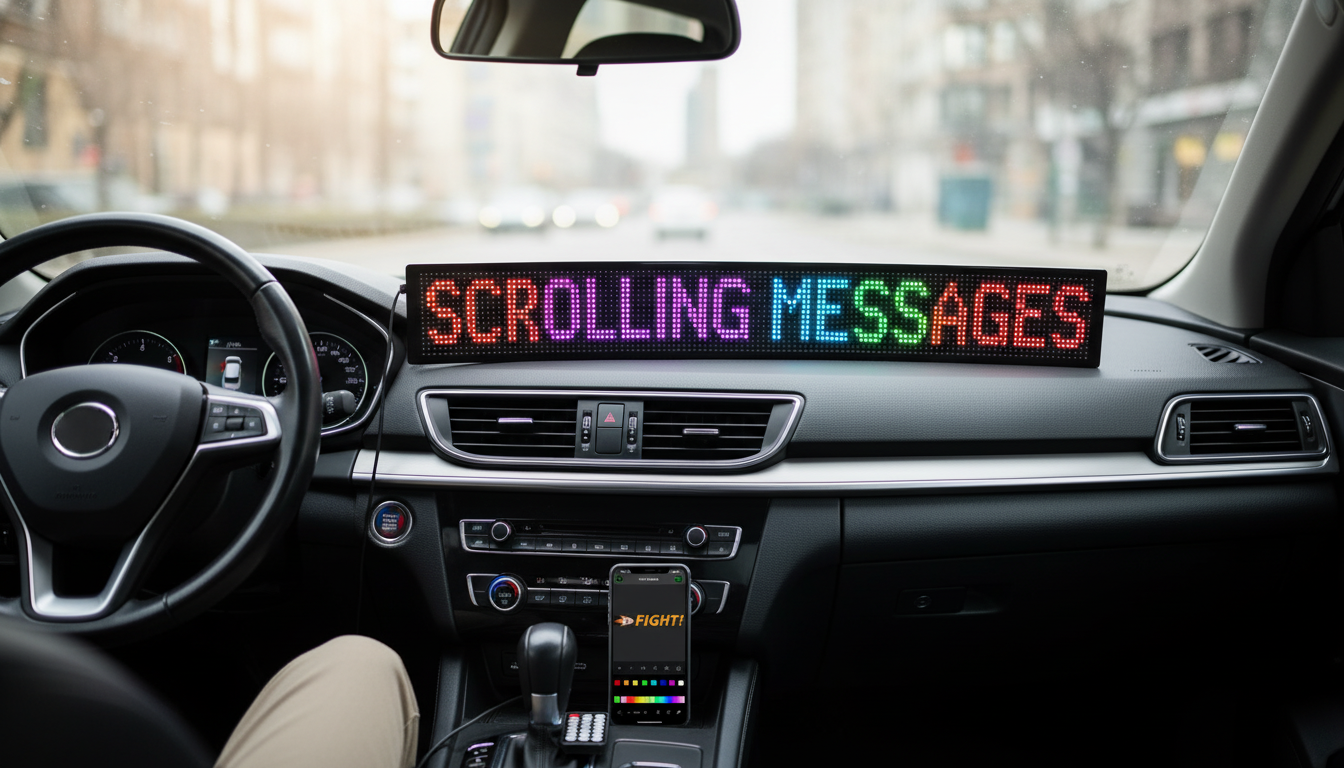
Car RGB LED Matrix Sign Panel – Bluetooth Scrolling Advertising Display
A programmable RGB LED matrix sign panel makes it easier to share short messages from a vehicle—whether for rideshare identification, delivery notices, safety reminders, or simple custom greetings. With Bluetooth control, color options, and scrolling text, it’s designed to be updated quickly without complicated wiring or tools.
For drivers who regularly stop for pickups, drop-offs, or curbside coordination, a compact LED message board can reduce guesswork and make your vehicle easier to spot. When used thoughtfully (clear wording, reasonable brightness, and non-distracting effects), it can communicate helpful cues without requiring paper signs that crease, fade, or need constant reprinting.
What This LED Matrix Sign Panel Is Designed to Do
A vehicle-friendly RGB LED matrix display is built for quick, glanceable communication. Instead of long messages, it’s best at short identifiers, directional hints, or simple promotions.
- Display customizable text and simple pixel-style graphics in RGB color
- Support scrolling, static, and attention-grabbing display modes for visibility
- Enable quick message changes from a phone via Bluetooth (useful for changing locations, offers, or pickup notes)
- Work for multiple scenarios: rideshare, delivery, small business promotion, event parking coordination, or personal messaging
- Offer a compact way to communicate externally without printing temporary signs
If you want a ready-to-go option, see the Car RGB LED Matrix Sign Panel – Bluetooth Scrolling Advertising Display.
Bluetooth Control and Message Setup
Bluetooth control is what turns an LED panel from a one-time accessory into something you can actually use daily. The best results come from messages designed for real-world viewing—moving pedestrians, angled windows, and limited time to read.
- Create short, high-contrast messages that are readable at a glance (keep wording brief and avoid dense lines)
- Use bright colors strategically: white/yellow for clarity, red for urgency, and brand colors for recognition
- Rotate between two or three key messages instead of long sentences to reduce distraction for other drivers
- Save common presets (e.g., “Pickup Here”, “Delivery”, “Open”, “Thank You”) for quick switching
- Test readability at different distances and angles before regular use, especially at night
For everyday use, treat the panel like a digital name tag: short, consistent, and instantly recognizable. That approach also helps reduce the temptation to over-animate the display.
Placement, Power, and Everyday Use in a Vehicle
Where you place the sign matters as much as what it says. A clear message is only helpful if it’s stable, visible to the intended viewer, and doesn’t interfere with safe driving.
- Choose a mounting location that doesn’t obstruct the driver’s view or interfere with airbags (avoid covering windshield areas needed for safe driving)
- Aim for stable placement to reduce vibration blur while driving; steadier positioning improves legibility
- Plan cable routing so it doesn’t cross pedals, steering, or shifting areas; keep wires secured and out of the way
- Consider when the sign should be on: parked or low-speed pickup situations are typically best for message clarity
- If used for business messaging, keep content consistent and professional to build recognition over time
Driver attention always comes first. If you find yourself adjusting the display while driving, pull over instead. Guidance from agencies on distraction is worth reviewing, including NHTSA’s overview of distracted driving and the FMCSA’s driver distraction resources.
Message Ideas for Rideshare, Delivery, and Local Promotion
Good LED messages are “fast to understand.” Pick one goal—identify the car, confirm the pickup, point to a location, or share a quick offer—and keep everything else out.
- Rideshare: name initials, pickup code, “Your Ride”, or a simple icon plus a short confirmation message
- Delivery: “Delivery”, “Drop-off”, “Food Order”, or “Customer Pickup” for curbside coordination
- Small business: limited-time offers, store hours, “Now Open”, or a QR-friendly short call-to-action (keep it short to avoid unreadable blocks)
- Events: “Parking →”, “VIP Check-in”, “Staff”, or group meetup identifiers
- Safety: “Student Driver”, “Caution”, or “Slow” (avoid messages that could be interpreted as official traffic control devices)
Color can carry meaning, but it can also confuse. To avoid mixed signals, keep “urgent” colors for genuinely important notices and avoid combinations that resemble emergency or official lighting.
Quick Reference: Use-Case Setup Checklist
| Use case | Suggested message style | Color/brightness tip | Placement tip |
|---|---|---|---|
| Rideshare pickup | Short ID + “Pickup” / “Your Ride” | White or yellow text, moderate brightness | Rear window area where it’s visible to the rider |
| Delivery drop-off | “Delivery” / “Drop-off” | High contrast; reduce glare at night | Visible from curbside without blocking driver view |
| Small business promo | 2–3 rotating lines (offer, hours, location) | Brand color accent + readable main text | Stable mount to avoid vibration blur |
| Event coordination | Directional arrow + short label | Bright but not strobing | Position for visibility from parking lanes |
When an LED Sign Is a Good Fit (and When It Isn’t)
More In-Stock Finds
- Portable Camping Cooler Bag
- 6pcs Transparent Plastic Christmas Ball Ornaments
- Waking the Peaceful Giant: How to Motivate Enneagram 9s (Digital Guide)
FAQ
Will the Bluetooth sign work with both Android and iPhone?
Compatibility depends on the companion app and your phone’s Bluetooth support. Check the product page details and make sure Bluetooth permissions are enabled for the control app.
Is it legal to use a scrolling LED sign on a car?
Rules vary by location and often depend on placement, brightness, and whether animations could distract other drivers. Check local vehicle equipment regulations and avoid emergency-like colors or attention-grabbing strobe effects.
How bright should the display be at night?
Lower the brightness to reduce glare while keeping the text readable. A practical method is to view it from behind the vehicle at a safe distance and adjust until it’s clear without being harsh.
Recommended for you


Was this article helpful?
Yes
No






Leave a comment