-
Shop
- Advanced Technologies
- AI Skills Mastery 2026 Collection
- Apple Accessories
- Arts, Crafts & Hobbies
- Best-Sellers
- Calvin Klein
- Car Accessories
- Christmas Collection
- Dating & Social Skills
- Denim
- 7FOR
- AGOLDE
- Antony Morato
- Armani Exchange
- Boss
- Brunello Cucinelli
- Calvin Klein Jeans
- Costume National
- Desigual
- Diesel
- Dolce & Gabbana
- Dsquared²
- Ermanno Scervino
- Fendi
- Gianni Lupo
- Guess Jeans
- Ichi
- Just Cavalli
- Lee
- Levi's
- Liu Jo
- Morgan De Toi
- Mother Denim
- Only
- Pepe Jeans
- Pinko
- Replay
- Tommy Hilfiger Jeans
- Valentino
- Vero Moda
- Digital Resources
- Car Buying & Ownership
- Cozy Feast Collection
- Emotional Intelligence
- Financial Education
- Home Styling & Organization
- Mindfulness
- Mindset
- Parenting & Child Development
- Pet Lifestyle & Wellness
- Positive Thinking
- Productivity
- Self Confidence
- Sleep Improvement
- Stress Management & Relaxation
- Travel Planning
- Yoga & Fitness
- Yoga & Mind-Body Practices
- Education & Learning
- Family & Parenting
- Fashion
- Accessories
- Alexander McQueen
- Bags
- Bags & Wallets
- Balenciaga
- Belts
- Blazers
- Blouses & Shirts
- Bottega Veneta
- Bottoms
- Brunello Cucinelli
- Burberry
- Chanel
- Chloé
- Dior
- Dolce & Gabbana
- Dresses
- Etro
- Gucci
- Hats & Hair Accessories
- Hoodies & Sweatshirts
- Jacquemus
- Jewelry
- Jil Sander
- Jimmy Choo
- Kiton
- Luggage
- Luggage Bags
- Men's Fashion
- Miu Miu
- Off-White
- Outerwear
- Prada
- Rick Owens
- Saint Laurent
- Skirts
- Socks & Tights
- Sunglasses
- Sweaters & Cardigans
- The Row
- Tom Ford
- Tops & Shirts
- Valentino Garavani
- Versace
- Vivienne Westwood
- Watches
- Fashion Accessories
- Furniture
- Gadgets
- Health & Beauty
- Health & Wellness
- Home & Garden
- Home Supplies
- Kids & Babies
- Lighting
- Patio, Lawn & Garden
- Personal Growth
- Pet Care
- Pet Supplies
- Pets
- Shoes
- Sport & Outdoors
- Super Deals
- Thanksgiving Digital Collection
- AI & Tech-Enhanced Thanksgiving
- Budgeting & Smart Shopping
- Eco-Friendly & Sustainable Thanksgiving
- Family & Kids
- Gift Ideas Guides
- Gratitude & Mindfulness
- History & Meaning
- Hosting & Planning
- Leftovers & Storage
- Pets & Thanksgiving
- Social Media Captions & Ideas
- Thanksgiving DIY Ideas
- Thanksgiving Recipes
- Thanksgiving Products
- Travel
- Wealth
- Wealth Building
- Budgeting & Saving
- Cryptocurrency Investing
- Debt Management
- Entrepreneurship & Business Growth
- Family Finance & Budgeting
- Financial Independence
- Financial Mindset & Psychology
- Financial Planning
- Frugal Living & Expense Hacks
- Goal Setting
- High-Income Skills
- Investing Basics
- Leadership
- Motivation
- Networking & Mentorship
- Passive Income Strategies
- Real Estate Investing
- Side Hustles
- Stock Market Investing
- YouTube Shorts Best-Sellers
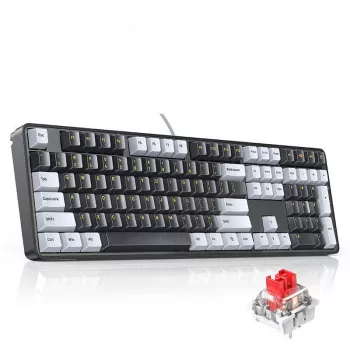
108-Key PBT Mechanical Keyboard with Red Switches
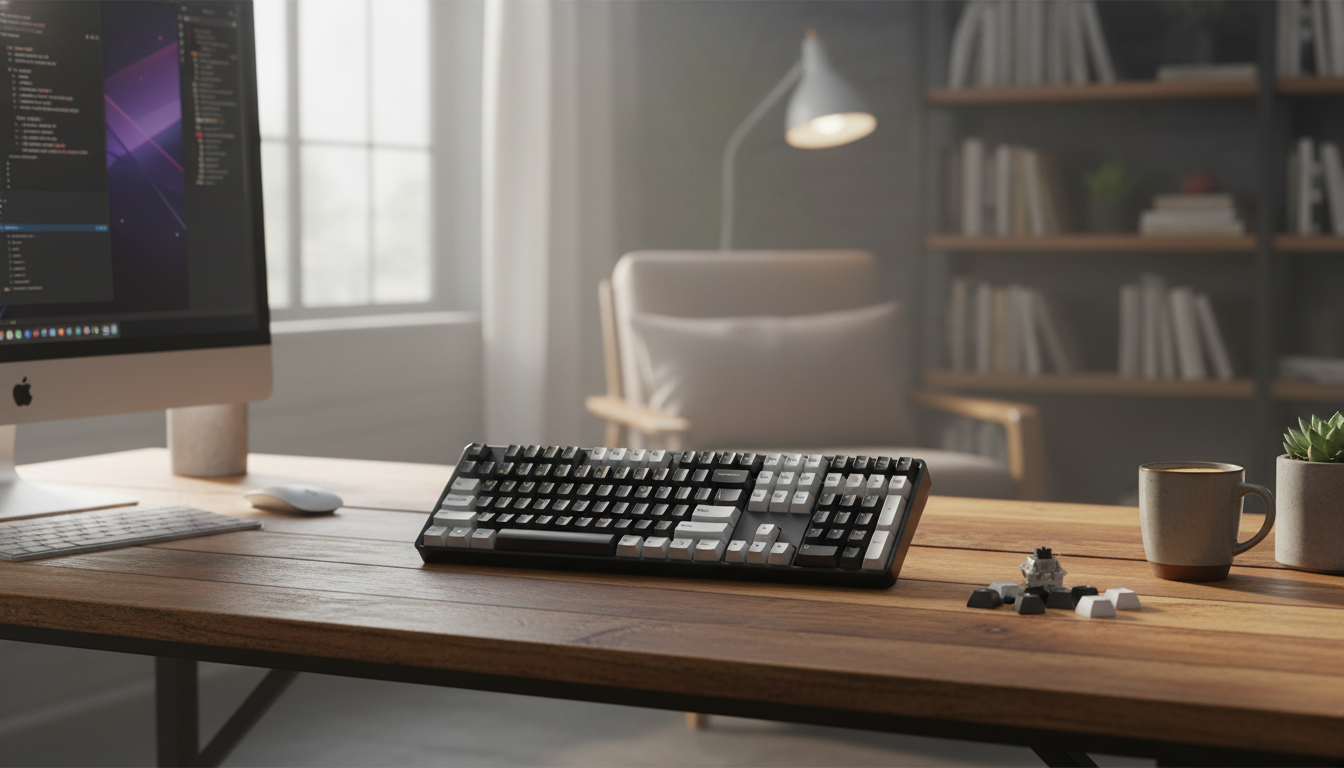
Mechanical Keyboard with 108 PBT Keycaps and Red Switches: Feel, Fit, and Everyday Performance
A full-size wired mechanical keyboard can be a practical upgrade for gaming and long typing sessions when the keycaps resist shine, the switches stay consistent, and the layout includes a complete numpad. This guide breaks down what matters most—PBT keycaps, red linear switches, build choices, and daily usability—so the keyboard matches the way it’s actually used.
What a 108‑Key Full-Size Layout Adds to Daily Use
A 108-key full-size layout keeps the standard footprint many people learned on, while adding the dedicated clusters that reduce reliance on function layers. If a keyboard is shared between work, school, and gaming, that familiarity can be just as important as switch feel.
- Full number pad: Faster numeric entry for spreadsheets, accounting work, inventory counts, and calculators without layered shortcuts.
- Dedicated navigation keys: Insert/Home/Page Up/Page Down make editing, coding, and document review more efficient.
- Minimal adjustment time: Standard spacing helps muscle memory carry over from laptop and office keyboards.
- Desk fit tradeoff: Full-size boards reduce mouse room; a larger mousepad or a slightly higher mouse sensitivity can balance the setup.
PBT Keycaps: Durability, Texture, and Legends
Keycaps are where hands spend all their time, so material choice matters. PBT (polybutylene terephthalate) is commonly favored for its wear characteristics and texture, especially for users who type for hours or play games that demand constant movement keys.
- Resists shine: PBT typically stays more matte over time, helping keys keep a grippy feel during long sessions.
- Sound and weight: Thicker, denser PBT can nudge the sound toward a deeper tone (though the case, plate, and stabilizers also play big roles).
- Fit and stability: Consistent stems help reduce key wobble, which can make rapid tapping or strafing feel more precise.
- Legends and longevity: Dye-sublimation and double-shot methods generally outlast simple printed legends; it’s worth confirming the method if you plan to mix keycap sets later.
- Cleaning: PBT usually tolerates gentle washing well; just ensure stems are fully dry before reinstalling to protect switches.
| Feature | PBT keycaps | ABS keycaps |
|---|---|---|
| Surface over time | Usually stays more matte, less prone to shine | Often develops shine with heavy use |
| Feel | More textured, grippier for many users | Smoother, can feel slick as it wears |
| Sound (depends on board) | Often a bit deeper/less sharp | Often a bit brighter/sharper |
| Color and legends | Can be very durable; method varies | Wide variety; method varies |
For a quick reference on the material itself, see Britannica’s overview of polybutylene terephthalate (PBT).
Red Switches: Linear Motion for Fast Inputs
Red switches are known for a smooth, linear keypress—no tactile bump and no click mechanism. That consistent travel can feel quick and predictable, particularly in games with repeated movement inputs and frequent re-centering of fingers.
- Smooth repeats: Linear travel helps with rapid double-taps, rhythm-based key patterns, and consistent strafing.
- Lower perceived noise: Without a click jacket, reds are typically quieter than clicky switches, though stabilizers and case acoustics still matter.
- Light touch learning curve: Some users experience more accidental presses due to the lack of tactile feedback; actuation force and typing habits make a noticeable difference.
- Uniform feel across the board: Helpful when switching between gameplay keys, function keys, and the numpad without a change in feedback style.
For switch fundamentals and typical characteristics of linear reds, Cherry’s reference page is a useful baseline: Mechanical keyboard switch basics (Cherry MX Red).
Wired Connection: Stability, Latency, and Setup
A wired mechanical keyboard prioritizes straightforward reliability: plug in, start typing, and skip battery management. In busy wireless environments (apartments, offices, tournaments, classrooms), wired also sidesteps interference concerns and pairing hassles.
- Consistent connection: Wired avoids signal congestion and removes the variable of battery performance.
- Plug-and-play convenience: Great for shared desktops, workstations, and travel setups where quick setup matters.
- Cable routing: Strain relief and sensible routing reduce wear; consider whether your desk benefits from left/right/center cable direction.
- Broad compatibility: Standard typing uses USB HID, which is widely supported across Windows, macOS, and Linux. (Advanced lighting or macro features may still use optional software.)
For a technical look at how standard keyboard input works over USB, USB-IF’s overview of USB HID (Human Interface Device) is a solid reference.
Stabilizers and Large Keys: Spacebar, Enter, Shift
Who This Type of Keyboard Fits Best
Product Snapshot: Mechanical Keyboard 108 Keys with PBT Keycaps and Red Switches
Mechanical Keyboard 108 Keys PBT Keycaps Wired Gaming Keyboard with Red Switches
| Item | Details |
|---|---|
| Product | Mechanical Keyboard 108 Keys PBT Keycaps Wired Gaming Keyboard with Red Switches |
| Layout | 108-key full-size |
| Keycaps | PBT |
| Switch type | Red (linear) |
| Connection | Wired |
| Availability | In stock |
A small add-on for desk setups
For users building a compact streaming corner or keeping an eye on a workspace, a simple accessory can complement a keyboard-focused setup without changing how the desk feels day to day: Mini HD 720P WiFi Camera.
FAQ
Are PBT keycaps better for long-term use than ABS?
PBT keycaps typically resist developing a glossy shine and tend to keep a more textured feel after heavy use. They can also slightly deepen the sound profile, but legend durability depends on the specific manufacturing method and overall keycap quality.
Are red switches good for typing as well as gaming?
Red linear switches can be excellent for both because the keystroke is smooth and consistent, which supports speed and repeated inputs. Some typists may need an adjustment period to avoid accidental presses since there’s no tactile bump, and comfort can also depend on stabilizer tuning and keycap feel.
Does a wired mechanical keyboard reduce input delay compared to wireless?
A wired keyboard avoids wireless interference and battery-related performance changes, which helps keep behavior consistent. Real-world delay differences vary by device, but wired is generally straightforward and dependable for competitive or shared setups.
Recommended for you

Was this article helpful?
Yes
No







Leave a comment